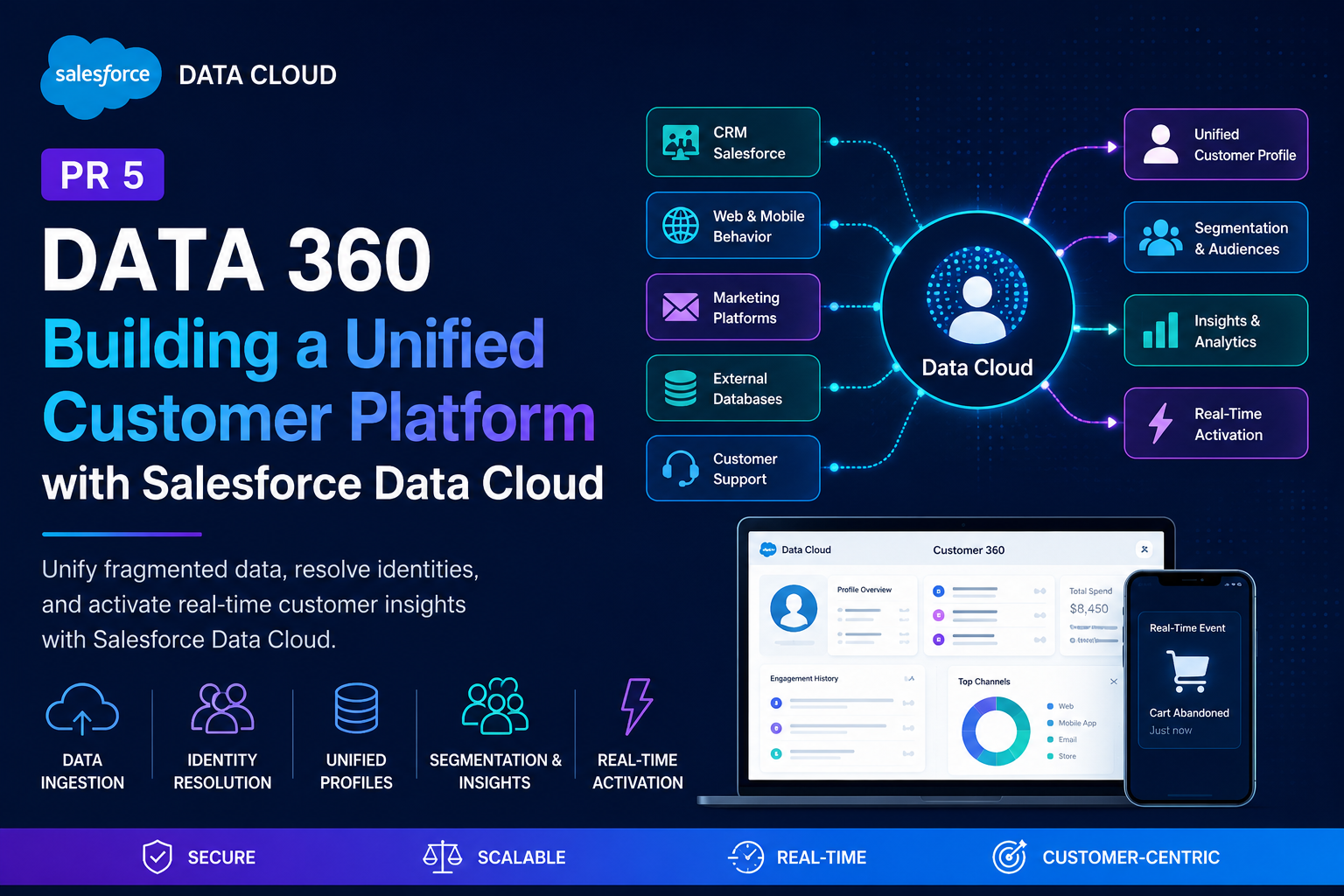
Customer data is everywhere.
A single customer may interact with a company through a website, mobile application, customer support team, marketing campaigns, and CRM systems. Unfortunately, this information often lives in separate systems that do not communicate with each other.
As organizations grow, this fragmentation creates duplicate customer records, inconsistent information, and incomplete customer journeys.
As part of my Salesforce learning journey, I wanted to understand how modern enterprises solve this problem. This led me to build PR5, a hands-on Salesforce Data Cloud project based on the Salesforce Data Cloud Consultant Certification Course.
This project became one of the most comprehensive projects in my portfolio because it combined data engineering, identity resolution, analytics, API integrations, real-time event processing, and extensive troubleshooting.
Understanding Salesforce Data Cloud
Salesforce Data Cloud is a Customer Data Platform (CDP) that helps organizations unify customer information from multiple systems into a single source of truth.
Instead of keeping customer information isolated inside different applications, Data Cloud creates a unified customer profile that can be used for analytics, marketing, personalization, and customer engagement.
My goal was to build a miniature Customer 360 architecture that simulates how enterprises manage customer data.
Building the Data Foundation
The project started by learning how data enters Salesforce Data Cloud.
I explored Data Streams, Data Spaces, Data Lake Objects, and Data Model Objects.
This stage helped me understand how Salesforce stores and organizes customer data before it becomes usable.
I also learned that data rarely arrives in a clean format. Different systems may use completely different field names for the same information.
For example, phone numbers may appear as Mobile_Number, Customer_Phone, CellPhone, or Phone.
This challenge introduced me to data harmonization.
Learning Identity Resolution
One of the most fascinating topics in Data Cloud is Identity Resolution.
The objective is simple: determine whether multiple records belong to the same customer.
I learned several matching techniques.
Exact Match is used for stable identifiers like email addresses.
Exact Normalized Match is useful for phone numbers because customers often enter them using different formats.
Fuzzy Match helps identify customers even when names vary slightly.
For example:
Lilian
Liliana
Lili
Salesforce can intelligently determine that these records may represent the same person.
This process eventually creates a unified customer profile.
Resolving Data Conflicts
Another challenge appears when different systems provide conflicting information.
Which value should Salesforce trust?
I learned three reconciliation strategies.
Source Priority trusts the most reliable system.
Last Updated trusts the newest information.
Most Frequent trusts the value that appears most often.
These strategies ensure customer profiles remain accurate.
Exploring Customer Data
I also learned how administrators and analysts validate data.
Data Explorer helped me inspect records.
Query Editor allowed me to investigate complex datasets using SQL.
Profile Explorer allowed me to view unified customer profiles.
These tools provided visibility into how customer data flows through the entire system.
Building Segments and Insights
Data Cloud is not only about storing customer information.
Organizations also need actionable intelligence.
I explored audience segmentation by creating use cases such as:
Dormant customers
High-value customers
Re-engagement campaigns
Marketing audiences
I also studied Calculated Insights and Streaming Insights.
Calculated Insights analyze historical data.
Streaming Insights process live customer interactions in real time.
This demonstrated how enterprises can combine historical analytics with event-driven experiences.
API Integration and External Client Apps
One of the most challenging sections involved connecting external systems to Salesforce.
I configured External Client Apps, OAuth permissions, and authentication settings.
I also learned how Salesforce security architecture has evolved and how older Connected App approaches differ from newer implementations.
Using Postman to Test Salesforce APIs
I used Postman to understand how enterprise applications securely communicate with Salesforce.
The process involved:
Generating Salesforce access tokens
Generating Data Cloud access tokens
Testing API requests
Executing streaming events
This gave me valuable practical experience with enterprise authentication workflows.
Troubleshooting Was the Biggest Teacher
The most valuable lessons came from solving problems.
I encountered numerous errors during implementation.
Some examples included:
INVALID_FIELD relationship mapping errors
Batch Data Transform processing locks
Missing Connected App interfaces
OAuth invalid_grant authentication failures
Streaming API payload errors
Rather than skipping these issues, I investigated each one individually and learned how Salesforce security, integrations, and architecture work behind the scenes.
This troubleshooting journey significantly improved my problem-solving skills.
Final Thoughts
PR5 became much more than a certification exercise.
It became a complete Customer 360 learning project that exposed me to real-world Salesforce Data Cloud implementation concepts.
This project taught me how modern organizations ingest, harmonize, unify, analyze, and activate customer data at scale.
More importantly, it taught me that understanding enterprise systems is not only about configuration. It is about learning how to troubleshoot, adapt, and build resilient solutions when things do not work as expected.
This project strengthened my foundation in Salesforce Data Cloud and gave me practical experience that I can apply to future Customer 360 implementations.